LaTeX Table Generator
Paste cells from a spreadsheet, a CSV or an old tabular and this LaTeX table generator writes the code, with special characters escaped and the packages listed. A typeset proof from the LaTeX table generator then shows whether it fits your document class.
Example table: Model comparison. Paste cells into A1, or use Import, to load your own data into the LaTeX table generator.
| Row | |||
|---|---|---|---|
Click a column letter for rounding, bold-best and decimal alignment.
Table settingslines, caption, environment, size
Will it fit the page?
| Model | Top-1 (%) | Params (M) |
| ResNet_50 | 76.1 | 25.6 |
| ViT-S/16 | 79.9 | 22.1 |
| ConvNeXt-T | 82.1 | 28.6 |
The LaTeX table generator measures widths from this preview, set in Computer Modern at the class’s type size. It is an estimate, so compile once before you submit. Using a class the LaTeX table generator doesn’t list (revtex, llncs, elsarticle, beamer)? Pick the one with the nearest column width and type size (classes differ: IEEEtran sets tables in 8pt), and compile to check; the estimate is only as close as that match.
Code from the LaTeX table generator
% Add to the preamble:
% \usepackage{booktabs}
\begin{table}[htbp]
  \centering
  \caption{ImageNet accuracy and model size}
  \label{tab:results}
  \begin{tabular}{l r r}
    \toprule
    Model      & Top-1 (\%)    & Params (M) \\
    \midrule
    ResNet\_50 & 76.1          & 25.6 \\
    ViT-S/16   & 79.9          & \textbf{22.1} \\
    ConvNeXt-T & \textbf{82.1} & 28.6 \\
    \bottomrule
  \end{tabular}
\end{table}Report a problem or suggest an improvement.
Preamble
\usepackage{booktabs}\toprule, \midrule and \bottomrule
Put these lines before \begin{document}. Full document already has them, set up for article.
LaTeX table generator examples
Twelve tables in the shapes papers use, stored as real LaTeX and read by the same importer as your own code. Click one to load it into the LaTeX table generator; the numbers are sample data.
How to use the LaTeX table generator
- Paste cells from Excel, Google Sheets or Numbers into A1 of the LaTeX table generator, or Import a CSV, Markdown or LaTeX table.
- Select cells and press Merge for a heading across columns or a category down rows. Under each spanning heading the LaTeX table generator adds the short \cmidrule that booktabs recommends.
- Click a column letter to round, bold the highest or lowest value, or align decimals with siunitx, values with an uncertainty such as 0.0123 ± 0.0004 or 0.0123(4) included. The LaTeX table generator rounds in the code only; your data stays as pasted.
- Pick your document class. The LaTeX table generator sets the table at its column width and type size and, if it overflows, gives TeX’s warning and one-click fixes.
- The Copy button: the code the LaTeX table generator copies starts with the \usepackage lines it needs, as comments, to move into your preamble (they are also listed under Preamble). Full document, Download .tex and Open in Overleaf give a file that compiles on its own. Next visit, the LaTeX table generator offers your last table back.
When the table is too wide
The usual complaint after pasting table code that wasn't made in a LaTeX table generator with a fit check is an Overfull \hbox warning. LaTeX never shrinks a tabular: each column is its longest entry plus 6pt of \tabcolsep a side (5pt in acmart), and a two-column conference column is only 3.5 inches wide.
This LaTeX table generator measures the typeset width against the line widths below, taken from the class files, and tells you before you reach Overleaf. It also follows each class’s own table settings: IEEEtran sets floats in 8pt footnote type, and acmart uses 5pt column spacing.
| Document class | Column width | Text width | Table type |
|---|---|---|---|
\documentclass{article} | 345pt | 345pt | 10pt |
\documentclass[11pt]{article} | 360pt | 360pt | 10.95pt |
\documentclass[12pt]{article} | 390pt | 390pt | 12pt |
\documentclass{article} + \usepackage[margin=1in]{geometry} | 469.75pt | 469.75pt | 10pt |
\documentclass[twocolumn]{article} | 229.5pt | 469pt | 10pt |
\documentclass[conference]{IEEEtran} | 252pt | 516pt | 8pt |
\documentclass[sigconf]{acmart} | 241.15pt | 506.3pt | 9pt |
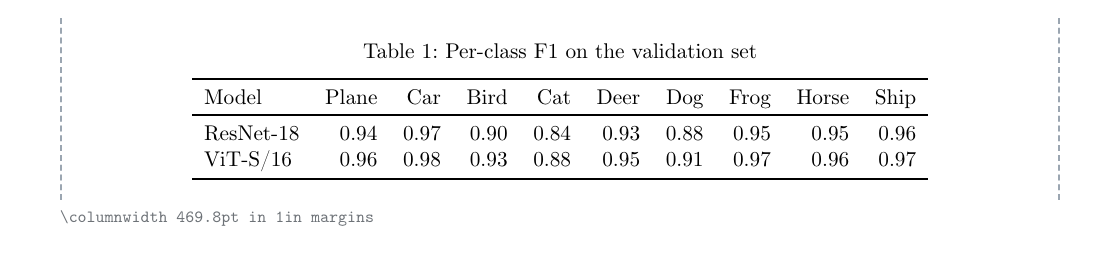
article with 1in margins. Fits: 346.3pt of 469.8pt
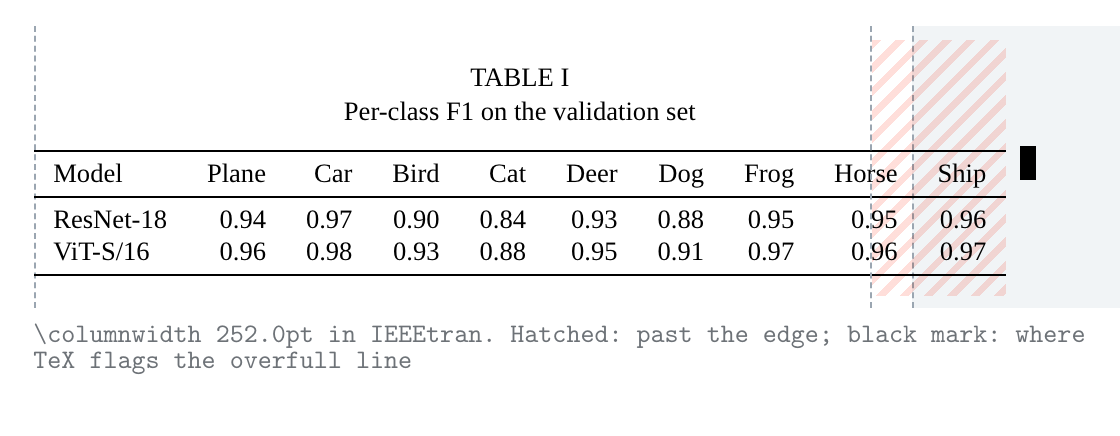
IEEEtran. Too wide: the table is 16% wider than the IEEEtran column (292.6pt against 252.0pt, 40.6pt over).
Seven fixes, gentlest first
| Fix | In the code | What it does |
|---|---|---|
| Tighter column spacing | \setlength{\tabcolsep}{4pt} | The LaTeX table generator sets 4pt instead of 6pt on each side of a column, saving 4pt per column. |
| Break long headers onto two lines | \makecell[r]{CIFAR-100 \\ acc.} | Headers wider than the numbers under them wrap at a space; the LaTeX table generator breaks only those. |
| Smaller type | \small, \footnotesize or \scriptsize | The LaTeX table generator adds \small to the table (after the caption, so the caption keeps its size): 9pt type in a 10pt document, 8pt with \footnotesize, 7pt with \scriptsize. |
| Wrap the long text columns | tabularx with X columns (xltabular for a long table) | The LaTeX table generator turns each long text column into an X column that wraps, so the table fills the line; short columns and numbers stay on one line. |
| Span both columns | table* instead of table | In two-column classes the LaTeX table generator offers the full text width, at the top of a page. |
| Scale to the line width | \resizebox{\linewidth}{!}{...} | Shrinks everything; the LaTeX table generator shows the resulting type size first. |
| Turn it sideways | sidewaystable from rotating | The LaTeX table generator gives the table a landscape page of its own. |
What goes into the code
Escaping
Ten characters mean something special to LaTeX, and one stray character in a cell can stop the document compiling. Straight quotes become TeX quotes too, so "pilot" is written ``pilot''. The LaTeX table generator escapes them as it writes each cell, but leaves math between dollar signs and commands you typed, such as \cite{key}, so you can mix data and LaTeX.
The LaTeX table generator also converts symbols pdfLaTeX can’t print from its default fonts: ± becomes $\pm$, × becomes $\times$, µ becomes \textmu{}, ° becomes \textdegree{}, and Greek letters and math symbols such as ≤ ∈ ⇒ ∂ become their math commands. Accented letters such as é stay as typed, which works in any LaTeX released since 2018. Chinese, Japanese, Korean, Cyrillic and Greek text stops pdfLaTeX, so for those tables the full document is set up for XeLaTeX, and Open in Overleaf picks XeLaTeX for you. Anything that would still stop the run, such as an emoji, is flagged above the code.
Rules and spacing
With booktabs the LaTeX table generator writes \toprule, \midrule under the header and \bottomrule, with no vertical lines, plus a trimmed \cmidrule under a merged heading. Rules stop short of a \multirow instead of cutting through it.
Columns
In the LaTeX table generator, columns of numbers default to right alignment and text to left. A wrapping column becomes p{3cm} with \raggedright, or an X column when the table fills the line with tabularx. A decimal column becomes S[table-format=3.2], sized from the widest number in it after rounding.
Packages
The LaTeX table generator lists only the packages the table uses, each with its reason, and adds the ones that commands you typed need, such as \num or \checkmark.
Where the LaTeX table generator takes data from
- Excel, Google Sheets, Numbers
- Copy a range and paste it into A1 of the LaTeX table generator. Spreadsheets put tab-separated text on the clipboard, which keeps commas and decimal commas inside their cells.
- CSV and TSV files
- Import in the LaTeX table generator reads comma, semicolon and tab-separated files up to 2 MB, quoted fields included, into tables of up to 400 rows and 40 columns. For .xlsx, copy the cells instead. Columns written with decimal commas, such as 0,856, are read as numbers too and keep their commas.
- Markdown tables
- Pipe tables from GitHub, Notion or Obsidian keep the column alignment set by the colons in their separator row when the LaTeX table generator reads them.
- LaTeX from Overleaf
- Paste a tabular from an old paper or Overleaf project and the LaTeX table generator rebuilds it in the grid, merges and all, ready to restyle.
- Python and R
- Write the data frame to CSV (
df.to_csv()in pandas orwrite.csv()in R) or print it as Markdown, then paste it into the LaTeX table generator for booktabs, merged headers and a fit check the built-in exporters lack. The LaTeX table generator also reads code from xtable, kableExtra, stargazer, modelsummary or Stata's esttab as it is.
LaTeX table generator FAQ
Getting data into the LaTeX table generator
How do I get Excel or Google Sheets data into the LaTeX table generator?
Select the cells in Excel, Google Sheets, LibreOffice or Numbers, copy, click cell A1 in the LaTeX table generator and paste. The spreadsheet arrives as tab-separated text, so every cell lands in its own column, and a block of at least two rows and two columns pasted into A1 replaces the whole table, so no empty columns are left over.
Can the LaTeX table generator read a CSV file?
Yes. In the LaTeX table generator, use Import, then open a .csv, .tsv or .txt file or paste its contents. Quoted fields with commas, doubled quotes and line breaks inside a cell are read the way spreadsheet programs write them. Semicolon-separated files from European versions of Excel are detected too.
Can I edit an old table by pasting its LaTeX into the LaTeX table generator?
Yes. Paste tabular, tabularx, longtable or xltabular code (tabu and tabularray's tblr, talltblr and longtblr too, and the tables R and Stata write with xtable, kableExtra, stargazer, modelsummary or esttab) into any cell or into Import, and the LaTeX table generator reads it back into the grid. Cells, \multicolumn and \multirow spans, booktabs or \hline rules (\cline, double rules and uneven vertical lines such as |l|c|cc| stay as written), bold cells and columns set bold with >{\bfseries}, cell and row colors (as the nearest of the five fills), \tabcolsep, the caption and the label are read back, so you can edit visually and copy fresh code. What the LaTeX table generator can’t hold, such as extra row spacing, is listed in the import message.
Can the LaTeX table generator swap rows and columns?
Yes. The last button in the LaTeX table generator toolbar (under More on a phone or touch tablet) transposes the table, so a sheet laid out with one row per measure can become one column per measure. Merges and the bold, italics and fills set on cells move with them, so a heading across columns becomes a label down rows; the old label columns become the header rows. Column settings (rounding, bold-best, alignment) and rules between row groups belong to the old orientation: they are set aside and come back when you swap again (Undo works too). The result is cut to 400 rows and 40 columns.
How big a table can the LaTeX table generator handle?
Up to 400 rows and 40 columns. Anything longer than a page should use longtable, which repeats the header on every page; anything wider than the page is easier to read split into two tables.
What the LaTeX table generator writes
Does the LaTeX table generator work with Overleaf?
Yes. Copy the table code into your Overleaf project and move the \usepackage lines it starts with (as comments, also listed under Preamble) into the preamble, or press Open in Overleaf to start a new project containing a complete document with your table. Overleaf may ask you to sign in to its own site for that step.
Which characters get escaped by the LaTeX table generator?
Ten characters have special meanings: & % $ # _ { } ~ ^ and the backslash. An unescaped & starts a new column, so a cell like “R&D” breaks the row. The LaTeX table generator escapes them by default while leaving $math$ and \commands you typed alone; you can also escape everything or treat cells as raw LaTeX.
How do I merge cells in the LaTeX table generator?
In the LaTeX table generator, drag across the cells (or click one and Shift+click another) and press Merge. A merge across columns becomes \multicolumn; a merge down rows becomes \multirow from the multirow package, and the cells below keep their empty placeholders so every row still has the right number of columns. Split undoes it.
What is booktabs, and why is it the LaTeX table generator default?
booktabs is a package that adds \toprule, \midrule and \bottomrule: rules of different weights with proper spacing around them, and no vertical lines. Most journals and style guides prefer that look, so the LaTeX table generator starts with it. If your template wants every border, choose All borders under Table settings.
Can the LaTeX table generator bold the best result in each column?
Yes. In the LaTeX table generator, click a column letter and set Bold the best value to highest or lowest. The winner is chosen from the numbers as they are printed after rounding, ties are all bold, and the header row is ignored. Changing a number moves the bold automatically.
How does the LaTeX table generator line up numbers on the decimal point?
Set the column type to Numbers on the decimal point and the LaTeX table generator switches to siunitx. The column becomes a siunitx S column with a table-format worked out from your data, text in that column (like the header) is wrapped in braces so siunitx leaves it alone, and bold best values use \bfseries with detect-weight.
Which packages does the LaTeX table generator need?
Only the ones your table uses, listed under the code with a reason each: booktabs for the default rules, plus multirow, siunitx, array, tabularx, longtable or xltabular, graphicx, rotating, xcolor, makecell, capt-of, amssymb, pifont or float when a feature calls for them, fontspec and xeCJK when the table needs XeLaTeX, and packages for commands you type yourself, such as \num or \url. A plain grid table needs none.
Overleaf says Undefined control sequence \toprule. What is wrong?
The package that defines the command isn't loaded. The code the LaTeX table generator copies starts with the \usepackage lines it needs, as comments: remove the % and move those lines to the top of your document, above \begin{document}. The table itself goes where it should appear. Full document and Open in Overleaf already have them in place.
How do I add notes under a table from the LaTeX table generator?
Type them in Notes under the table, under Table settings: the LaTeX table generator writes them in footnote size under the table (after a long table), and reads them back when you import its code or a threeparttable. For notes that wrap exactly to the table width, load threeparttable and wrap the tabular in a threeparttable environment.
Can the LaTeX table generator round to significant figures?
It rounds to a fixed number of decimal places per column (0 to 4), which is what most results tables need. For significant figures, siunitx can do it at compile time with round-mode=figures in an S column.
Can the LaTeX table generator make an APA-style table?
Mostly: APA tables use horizontal rules only, which is the booktabs setting, with the caption above. APA also sets the table number in bold and the title in italics on separate lines; the apa7 class or the caption package does that for every table in the document.
Why does the LaTeX table generator put the caption above the table?
Most style guides (APA, IEEE, ACM, many journals) caption tables above and figures below, and booktabs spacing assumes it. Choose Below the table under Caption position if your template wants it the other way.
Can the LaTeX table generator add vertical lines and colored cells?
Yes. All borders draws every vertical and horizontal line; the fill menu in the toolbar (under More on a phone or touch tablet) shades cells with \cellcolor, and Shade alternate rows adds \rowcolors. The LaTeX table generator loads xcolor with the table option for both.
Fitting the page
My table is too wide for an IEEE or ACM column. What does the LaTeX table generator suggest?
Pick IEEEtran or acmart in Paper, in the pinned bar with the verdict (on a phone, at the top of Will it fit the page). The preview draws the 252pt IEEE column (241pt for ACM) and reports how many points the table overflows by, then lists fixes, each re-measured: tighter column spacing, two-line headers, a smaller type size, a wrapping column with tabularx (xltabular for a long table), spanning both columns with table*, scaling with \resizebox, or a sideways page.
\resizebox or a smaller font: which does the LaTeX table generator recommend?
Usually a smaller font. \resizebox is the last resort, which is why the LaTeX table generator lists it after gentler fixes: it scales the type, the rules and the spacing together, so a table squeezed to 70% has text noticeably smaller than footnotes. A size step (\small), tighter \tabcolsep or a wrapping column usually reads better. The fit list shows the resulting type size before you choose.
How close is the width check in the LaTeX table generator to real LaTeX?
Close, but it is an estimate from the preview, not a TeX run. In November 2026, 201 tables were compiled with pdfLaTeX (TeX Live 2026): the example tables in article, IEEEtran and acmart, plus extreme ones such as heavy math at every type size, regression tables with stars and standard errors, integrals and calligraphic letters in acmart, 20 columns, siunitx numbers with exponents or ± uncertainties in each class, bold numbers, two-row headers, symbols such as × and ±, and initials and sentence breaks in IEEEtran's Times. The LaTeX table generator's preview was within 1% on 178 of them and within 3.5% on all, and never more than 1.9% too narrow, so the status warns “Only …pt to spare” when less than 3% of the line is left. acmart sets math in its own Libertine math font, which the preview matches glyph by glyph from measured widths; for a symbol it hasn't measured it can be further off, so acmart tables with math that fit get the “Only …pt to spare” warning from 6%. A table shown more than 3.5% too wide overflows: no table in the test read that far wide. The check also follows each class's table settings, such as IEEEtran's 8pt float type and acmart's 5pt column spacing, and the wider fonts TeX uses at small sizes.
Can the LaTeX table generator make a long table continue across pages?
Yes. Choose longtable under Environment in the LaTeX table generator. The code repeats the header at the top of every page, adds a “Continued on next page” line at page breaks, and keeps the caption and label. The preview marks roughly where pages break for the chosen document class.
What does “Overfull \hbox” mean, and how does the LaTeX table generator catch it?
It is TeX's own warning that a line is wider than the space for it; for a table, the tabular is wider than \columnwidth and sticks into the margin. With tabularx the table stays at the line width, and the warning comes from a cell whose word is too long for its column, so the word sticks into the next one. The proof shows it before you compile, with the overflow in points and fixes measured against the chosen document class.
How do I put two tables from the LaTeX table generator side by side?
Generate each one with No float as the environment, then place both tabulars inside one table, each in a minipage of about 0.48\linewidth, or use the subcaption package for separate (a) and (b) captions. Check each half's width with the fit check first.
Does the LaTeX table generator work for a thesis template?
Yes. Many university templates use 1-inch margins; if yours does, choose article + 1in margins in the fit check for a close width, and use the full document only as a test file.
Can I use the LaTeX table generator for Beamer slides?
Yes. Choose No float under Environment to get a bare tabular (Beamer frames don't need a floating table), or keep table if you want a caption. A smaller type size such as \small often suits slides.
Limits and privacy
Is this LaTeX table generator free?
Yes, it is free and there is nothing to sign up for. The LaTeX table generator runs in your browser: the cells you type, paste or import are turned into code on your own device and are not uploaded, unless you press Open in Overleaf, which sends the document to Overleaf.
Can the LaTeX table generator read a table from a screenshot or PDF?
No. The LaTeX table generator works from text: reading a table from an image needs an OCR or vision model, and the result can't be checked against your data. If the table is in a PDF you can select, copy the text into a spreadsheet first; then paste it here.
Can the LaTeX table generator export Markdown or HTML?
No, it writes LaTeX only. It reads Markdown tables, so you can bring one in and get LaTeX out, but for the reverse direction a general table converter is the better tool.
Does the LaTeX table generator use AI?
No. It follows fixed rules from the LaTeX, booktabs and siunitx documentation, so the same table always gives the same code, and nothing you type is sent to a language model.
Does the LaTeX table generator keep my table if I reload the page?
Yes. In the same tab, the table and its settings are kept in session storage, so a reload or an accidental back-and-forward doesn't lose them. A copy of your last table also stays in this browser's local storage (latex-table-generator:last), with your paper and style choices (latex-table-generator:prefs): a later visit to the LaTeX table generator starts with those choices and offers "Restore it" for the table. Nothing is stored on a server, and clearing this site's data removes both.
Can I use code from the LaTeX table generator in a paper or thesis?
Yes. The code made from your data is yours to use in papers, theses, books and slides, commercial or not, with no credit needed.
Does the LaTeX table generator work on a phone or without internet?
It works in any current browser, including on phones and tablets, though a large table is easier to edit on a wider screen. Once the page has loaded, building tables needs no connection; only Open in Overleaf, feedback and analytics use the network.
Does the LaTeX table generator write tabularray or Typst tables?
No. It writes the classic tabular family (tabular, tabularx, longtable, and xltabular for a long table that fills the line) with booktabs, multirow and siunitx, which every LaTeX distribution and journal template accepts. Code using tabularray's tblr can be imported for its cell contents.
Sources
Widths in the LaTeX table generator were checked in November 2026 against classes.dtx from the LaTeX kernel, IEEEtran.cls V1.8b (2015/08/26) and acmart v2.21 (2026/11/01).
The rules the LaTeX table generator follows come from the package and class documentation below.
- booktabs by Simon Fear and Danie Els: rule weights, spacing and the advice against vertical rules.
- siunitx by Joseph Wright: S columns, table-format and detect-weight.
- LaTeX standard classes (classes.dtx): \textwidth of 345pt, 360pt and 390pt for 10, 11 and 12pt article.
- IEEEtran by Michael Shell: 21pc columns, 1pc gap, 43pc text width.
- acmart by Boris Veytsman: sigconf geometry (54pt side margins, 2pc column gap, 9pt type).
- Overleaf API: the form used by Open in Overleaf.